
Scenes
Save a complete look and recall it in one tap.
 1
2
3
4
5
1
2
3
4
5
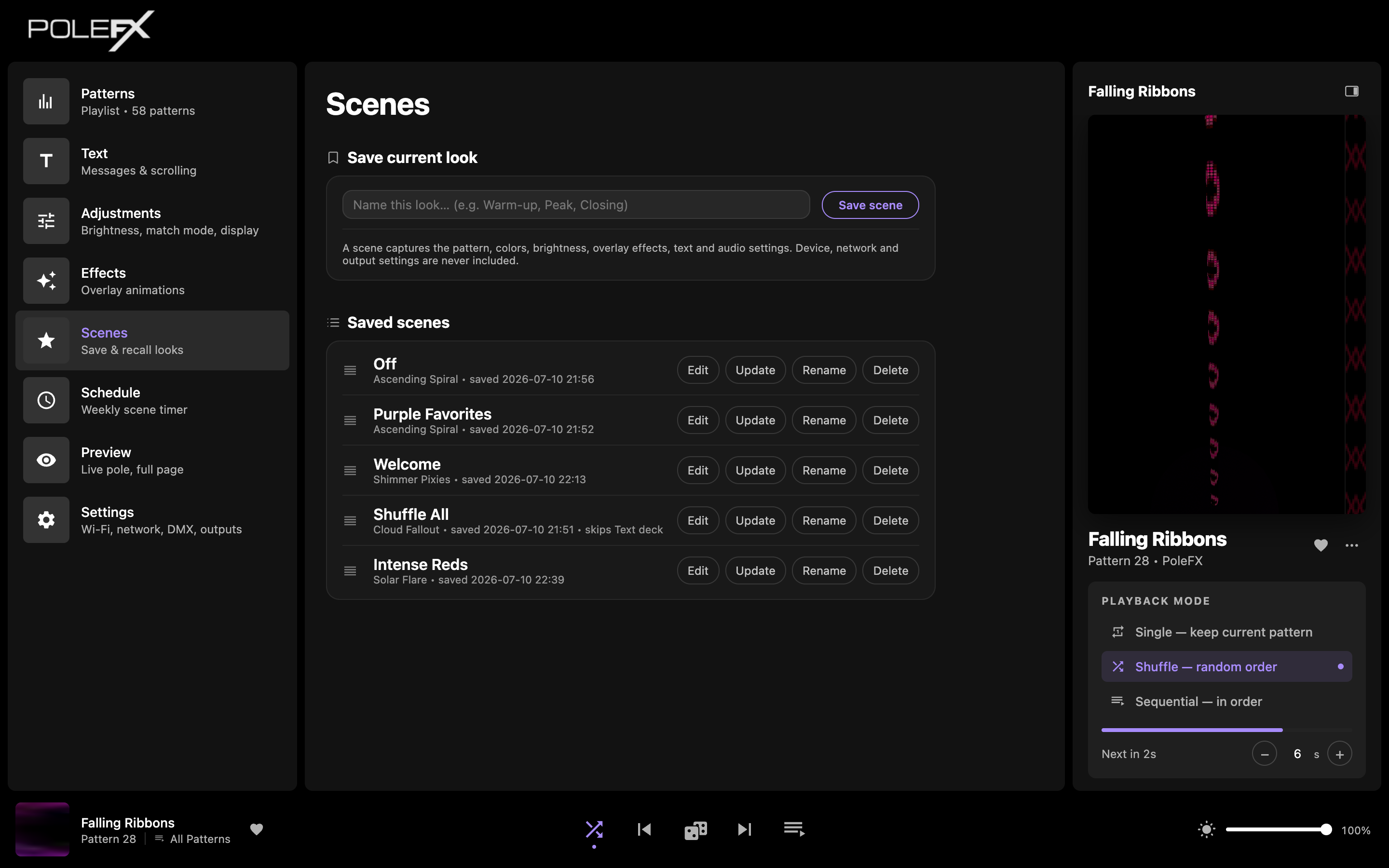
- Name field Under Save current look. Name the look before you save it; the field suggests Warm-up, Peak and Closing.
- Save scene Records the look the pole is showing right now, under that name. This is the button that creates everything in the list below.
- What a scene takes The page states its own scope: the pattern, the colors, the brightness and the text. Device, network and output settings are never included.
- A saved scene One recorded look, in the Saved scenes list. The line under the name gives the pattern it holds, when it was saved, and anything it is set to leave alone: Shuffle All in this capture reads "skips Text deck". Click the row to apply it, or drag it by the handle at the left to reorder the list.
- Row actions Edit chooses which groups of settings the scene recalls. Update overwrites it with the look on the pole now. Rename changes the label. Delete removes it. Update and Delete ask before they act.
Save a look
Name the current look (e.g. Warm-up, Peak, Closing) and press Save scene.
What a scene captures
The pattern and the playback mode, the color mode, the brightness, and both halves of the text: whether messages are showing, and the messages themselves.
Device, network and output settings. Recalling a scene never changes how the pole is wired or addressed, whatever else the scene carries.
Applying a scene copies its saved values into the current settings and stops there. Nothing stays switched on, so anything you change afterwards simply overwrites it.
Edit on a scene narrows what it recalls, group by group: Pattern, Playback
mode, Color mode, Brightness, Text display, and Text
deck. Any group you
clear is left alone on recall, and the scene's row says so, as
skips Text deck does in the capture above. That is how a scene changes the
look without disturbing the message on the pole.
Saved scenes
Click any saved scene to restore that look at once. Each one also carries:
- Edit: choose which groups of settings it recalls.
- Update: overwrite it with the current look.
- Rename / Delete.
Drag the handle on the left to reorder the list.
Recalling one, step by step
-
Note what is playing
Look at the pole, or at the live preview. This is the look you are about to write over.
You should see The pattern, colors, brightness and text you have set up so far.
Careful If this look is worth keeping, save it as a scene of its own first. Recalling does not put it aside anywhere.
-
Click the scene's name
One click on the name in the list. There is no confirmation step and no separate apply button.
You should see The pole change at once. Every group the scene recalls takes the value it saved: the pattern and playback mode, the color mode, the brightness levels, and the text. Everything else, including all your device, network and output settings, is not touched and stays exactly where it was.
-
Read the row
Nothing to do here. The list marks the scene the pole currently matches.
You should see The row you clicked highlighted. That is a label saying "the pole still looks like this scene", not a switch holding it there.
-
Change something
Move any control the scene covers, such as the global brightness.
You should see Your new value on the pole, and the highlight gone from the row, because the pole no longer matches the scene. The scene itself is unchanged and still in the list.
The write happens once, at step 2, and then it is over. There is no scene off and nothing is put back when you move on: the next scene you recall, or the next slider you touch, simply writes over what this one wrote.
Update, Rename and Edit
The scene keeps its name and its place in the list, and takes the look the pole is showing right now. It asks first, and the question names the scene, which is worth reading: the old contents are gone.
A box opens with the current name in it. The saved look is untouched, so a scene you have spent an evening on is safe to relabel.
A panel opens in the row, headed "This scene recalls", with a checkbox per group. Clear one and the scene leaves that group alone from then on, and the row says which groups it now skips. Nothing is thrown away: tick the group again and it recalls as before.
Update and Delete both ask before they act. Rename and Edit do not, because neither one can lose you a look.
If a scene put its own messages on the pole, the Text page says so above the message list and offers to hand the pole back to your own messages.