
Patterns
Your playlist: the library of looks the pole plays, and the controls to organize and add to them.
 1
2
3
4
5
6
7
8
9
10
11
12
13
14
1
2
3
4
5
6
7
8
9
10
11
12
13
14
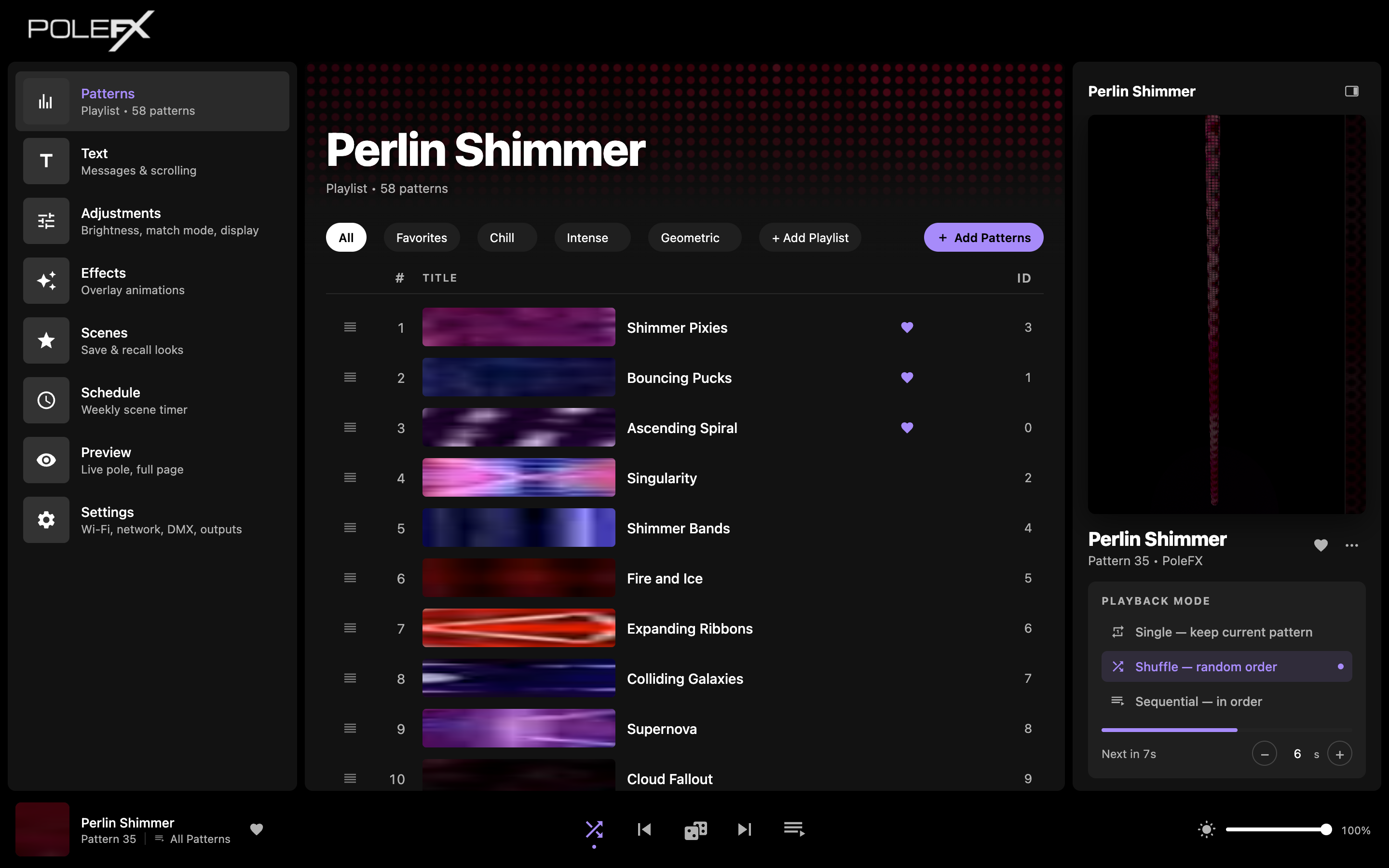
- Playing now The banner across the top names the pattern the pole is playing, and under it the playlist and how many patterns are in it. The playing pattern is often not one of the rows you can see, so this is where you read it.
- Playlist chips All, Favorites, and each playlist you have made. These change what the list shows, not what is playing.
- Add Playlist Makes a new named set you can switch between. It joins the row of chips.
- Add Video Uploads your own video content. This is the button to use first.
- Add Generative Creates a new code-generated pattern instead of uploading one. Edit code in the right panel opens the same editor for the pattern already playing.
- Drag handle Drag a row to change the play order.
- Thumbnail A preview strip of the pattern.
- Favorite Puts the pattern on the Favorites chip.
- ID The pattern's fixed number. It does not change when you reorder the list, which is why DMX and the keyboard shortcuts use it.
- Live preview The pole as it looks right now. The full page is under Preview.
- Pattern controls The settings of the pattern that is playing, which differ from pattern to pattern. Speed and Color here; another pattern offers whatever it was written with.
- Playback mode Single keeps the current pattern, Shuffle plays in random order, Sequential plays in order. The timer under it sets how long each one lasts.
- Transport Previous, random, next, and the queue view.
- Global brightness Scales the whole output.
The playlist
Every active pattern, in play order. Drag rows to reorder, click a pattern to play it. The thumbnail shows a preview strip, the heart marks favorites, and the ID is the pattern's fixed number (handy for DMX and keyboard shortcuts).
Play one, then move it
Two things happen on this list and they are easy to confuse. Clicking a row changes what the pole is doing. Dragging a row changes what plays next.
-
Click the pattern you want
Anywhere on the row except the drag handle and the heart.
You should see The row highlights, the right panel and the playback bar take its name and ID, and the pole changes at once. There is no apply step.
-
Drag it by the handle
Take hold of the handle at the left of the row and drop the row where you want it in the order.
You should see The # column renumber around the row you moved, the ID column stay exactly as it was, and the pole carry on with the same pattern. Moving a row does not play it.
Careful On a touchscreen, hold the handle still for a moment before you drag, or the list scrolls instead.
-
Confirm the new order
There is no save button: the order is stored as you drop. Reload the page to prove it. To hear the order, set the right panel to Sequential.
You should see The same order after the reload, and Sequential working down the list in it.
# is the position and it renumbers whenever you drag. ID is the pattern's own number and it never moves. That is why DMX and the keyboard keys address the ID: reordering the list would otherwise repatch the show.
Playlists & filters
The chips above the list (All, Favorites, and any custom playlists) filter what you see. + Add Playlist creates a new named set you can switch between, and it joins the same row.
The same library, seen three ways. Every pattern is still on the player in all three. What changes is what you see, and which set autoplay works through.
- What you see
- Every pattern on the player.
- How a pattern joins
- It is there already. Nothing to do.
- Order
- The master order. A playlist you have never reordered follows it.
- Autoplay cycles
- Every active pattern.
- Playback bar says
All Patterns
- What you see
- The patterns marked with a heart.
- How a pattern joins
- Tap the heart on its row, or the heart in the right panel or playback bar for the one playing.
- Order
- Its own. Dragging here leaves the master order alone.
- Autoplay cycles
- The favorites only.
- Playback bar says
Favorites
- What you see
- The patterns you put in it.
- How a pattern joins
- Open the ... menu on the pattern and add it.
- Order
- Its own, again. One pattern can sit in several playlists at different positions.
- Autoplay cycles
- That playlist only.
- Playback bar says
- The playlist's name.
Switching tabs never interrupts the pole. The pattern that is playing keeps playing, even if the tab you switched to does not contain it. What the tab does change is the set Shuffle and Sequential move through, which is why the playback bar names it at the bottom left. Dragging is the opposite: it changes the order for later and touches nothing that is playing now.
Playback mode
In the right-hand panel:
- Single: hold the current pattern.
- Shuffle: play the active patterns in random order.
- Sequential: play them in list order.
Shuffle and Sequential advance on the Autoplay Timer (set in Adjustments). The bottom bar has previous / random / next and a queue view.
What each mode does with the pattern that is on the pole right now, and where the timer comes into it:
The pattern you picked loops until you pick another. Nothing advances by itself, and the timer is ignored.
The current pattern plays out its time, then the player picks another at random from the set the playback bar names.
The current pattern plays out its time, then the next row down takes over, in the order you dragged the list into.
Seconds per pattern, set on Adjustments. It is what Shuffle and Sequential count down; in those two modes the right panel shows the countdown to the next pattern. Single never reads it.
The DMX autoplay channel is not a copy of these three buttons. Its highest setting plays each pattern through once with no timer, which the web app has no button for, so a console and this panel will not always agree about what mode the player is in.
Add patterns
+ Add Video uploads your own content, on a page headed Add custom patterns. File requirements:
| Property | Value |
|---|---|
| Resolution | 900 x 24 |
| Frame rate | 60 fps |
| Formats | .mov, .mp4 |
-
Open Add Video
The pink + Add Video button, at the right of the chip row.
You should see A page headed Add custom patterns, with a drop area under Upload pattern video, a Browse files button, and the requirements repeated: 900 x 24, 60 fps, .mp4 and .mov.
-
Choose the file
Drag it onto the drop area, or press Browse files and pick it.
You should see The file accepted and the upload start on its own. There is nothing else to press.
Careful Only
.mp4and.movare taken, and only up to 500 MB. Anything else is refused here, before it reaches the player. -
Let it upload and process
The player copies the file, reads its length, size and resolution, and builds the thumbnail you will see in the list.
You should see A row appear in the file list with the name, the date, the size, the duration, and the Resolution.
Careful Read that Resolution figure. The upload checks the file type, not the picture size, so a clip that is not 900 x 24 is accepted without a word of complaint and then squeezed to fit the pole. Nothing else will tell you.
-
Find it on the Patterns page
Go back to Patterns. New uploads are added to the end of the list.
You should see A new row at the bottom, active, named after the file without its extension, and holding the next free ID.
-
Play it
Click the row. Then drag it where you want it, and heart it if you want it in Favorites.
You should see Your content on the pole, and in the preview, at once.
What a pattern file is
One video, 900 pixels by 24, at 60 frames a second. Each frame is a whole picture of the pole, not a slice of one.

The long axis is the pole's length, and the left-hand end of the frame is the top of the pole, which is why a look that climbs the pole travels right to left across the file.
The short axis wraps the whole way around, so the top and bottom rows of your frame end up next to each other on the pole. Make them match or the seam shows.
Each frame replaces the last, so a 10 second clip holds 600 of them. The clip loops when it reaches the end.
It is ordinary video. Any editor that can export a 900 by 24 movie can make a pattern, and there is no PoleFX file format to learn.
The player resizes every frame onto the pole's own pixel count for you, so you never have to know what that is. What it cannot do is guess what you meant: a 1920 x 1080 clip is not rejected, it is crushed into a strip 24 pixels tall, and a circle drawn in it arrives as a smear. Export at 900 x 24 and what you drew is what lights up.
Edit patterns
Edit Patterns opens per-pattern options: toggle a pattern Active, rename it, assign a keyboard key, and set a per-pattern hue offset.
One row per pattern, and every field on it saves the moment you change it. There is no save button.
Assigned when the pattern arrives and fixed for life. This is the number DMX and the keyboard keys address, and the one to quote when you ask us about a pattern.
A text box. Renaming changes what the list, the panel and the playback bar call it, and changes nothing else: the ID stays, the order stays, DMX is unaffected.
A switch. Turn it off and Shuffle and Sequential stop reaching that pattern.
One letter or one digit, so the pattern can be called up from a keyboard. Letters are stored as capitals, and anything else is refused with a message. Keys are unique: give a key to a second pattern and it is taken away from the first, quietly.
A slider from 0.00 to 1.00 that shifts the pattern's colors. 0 leaves it exactly as its author drew it. It belongs to the pattern, so it survives every reorder and applies whenever the pattern plays. This is also what DMX channel 4 writes, so a console that has swept that channel has changed the values on this page.