
DMX Control
DMX512 is the standard the entertainment industry uses to control stage lighting. The PoleFX Player can take a DMX input and drive nine of its own settings from it, so a lighting desk can run the pole alongside everything else in a show.
DMX drives the Player, and the Player drives the poles. It does not address the LEDs. If you want to control every pixel yourself, that is a different job: see Pixel Streaming.
The Player acts on a channel when its value changes, not continuously. If the desk sets the brightness and you then move the web app slider, the web value stands until that fader moves again. This is worth knowing before you go looking for a fault: a console sitting at a value is not holding the pole to it.
Physical connection
Plug the female end of your DMX cable into the Player’s three-pin XLR input.

Pin 1 is ground, pin 2 is Data −, and pin 3 is Data +.
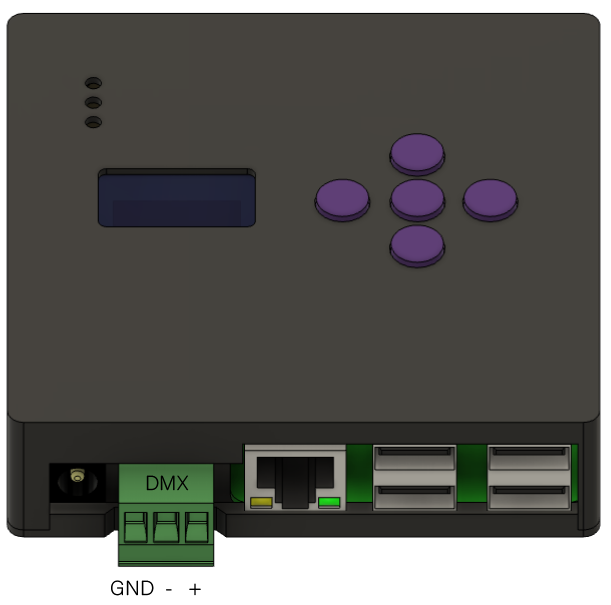
Have an older screw-terminal Player?
Older Players use a three-position screw terminal. Follow the Ground, Data − and Data + markings shown here. This image applies only to that hardware.
Turn it on
 1
2
3
4
5
1
2
3
4
5
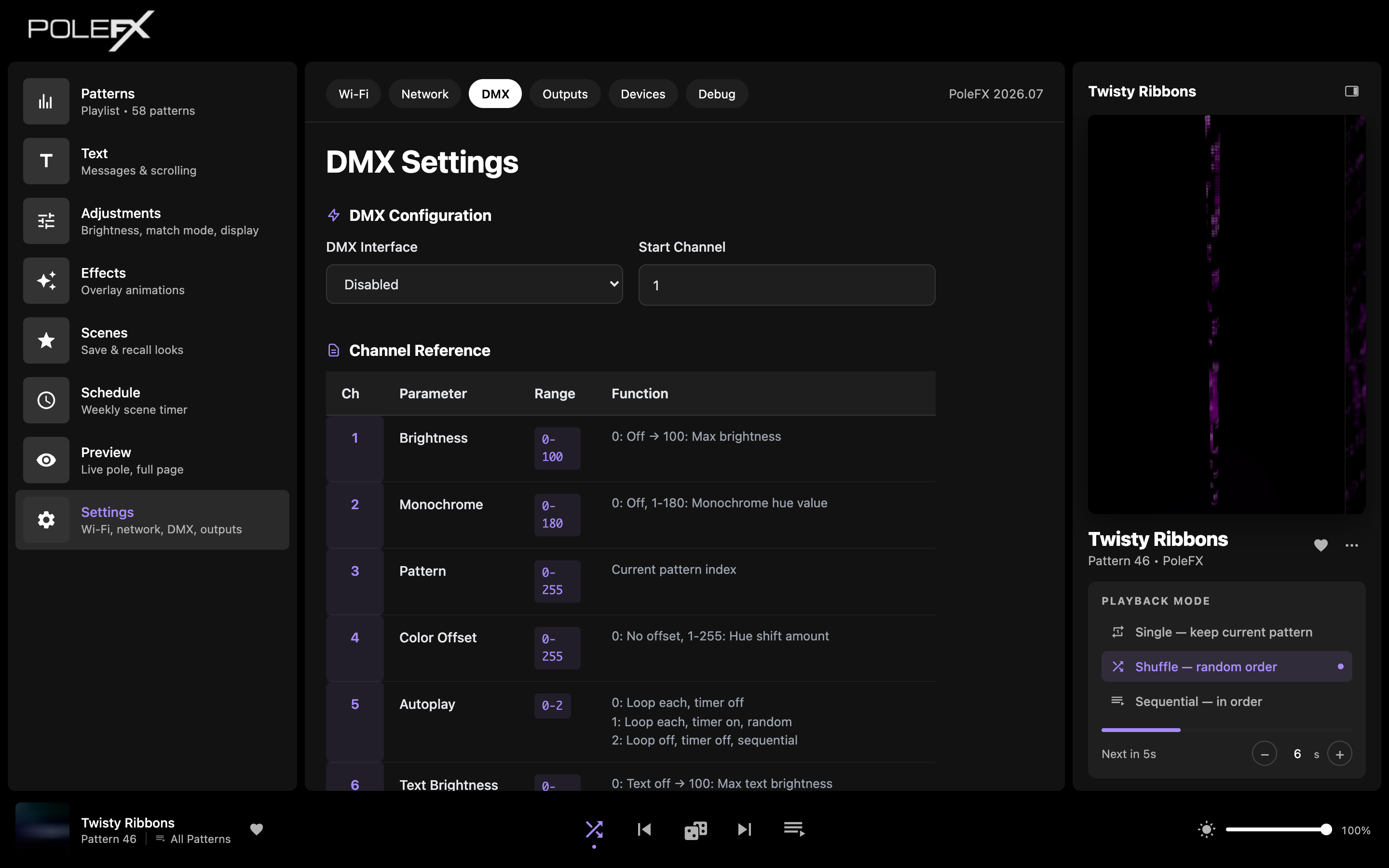
- DMX tab Third along the top of Settings, between Network and Outputs.
- DMX interface Set this to Enabled. Until you do, the Player ignores the incoming data completely.
- Start channel The console address of the first of the nine channels. Anything from 1 to 503, because the block is ten channels wide and has to end inside the universe.
- Channel reference The same table as below, on the Player itself, so you can patch without this page open. The header calls it a 10-channel window, which is the nine channels plus the reserved one.
- Serial monitor Enable monitor prints the incoming values so you can watch a console reach the Player. The page warns that it costs performance, so switch it off again for a show.
The nine channels
The Player reads a ten-channel window starting at your start channel. Nine of them do something; the tenth is reserved.
-
Ch 1start + 0Brightness
Global brightness, the same value as the slider in the bottom bar. Values above 100 are treated as 100.
0-100 -
Ch 2start + 1Monochrome
0 turns monochrome off. Any other value is the hue, and it also forces static color mode, so you cannot pick a gradient from the desk.
0-180 -
Ch 3start + 2Pattern
Selects a pattern by its fixed ID, the number in the ID column on the Patterns page. A value that matches no ID wraps into the list instead of being ignored, so a desk sweeping this channel always lands on something.
0-255 -
Ch 4start + 3Color Offset
Shifts the hue of the pattern that is playing. 0 is no shift. It writes the pattern's own Hue Offset, so the shift stays with that pattern after the show.
0-255 -
Ch 5start + 4Autoplay
0 loops the current pattern with no timer. 1 is the timed random mode. 2 or higher plays each pattern through once and moves on, with no timer.
0-2 -
Ch 6start + 5Text Brightness
One fader for two things: 0 turns text off, and any other value turns text on and sets its brightness.
0-100 -
Ch 7start + 6Transition Time
How many frames the fade out and back in takes when the pattern changes.
0-255 -
Ch 8start + 7Text Index
Which of your saved messages to show. The value wraps around the number of messages you have, so it is not a fixed range.
0-255 -
Ch 9start + 8Cue Pattern
Changing to 0 or 1 restarts the pattern from the beginning. Changing to anything higher jumps that fraction of the way in, out of 255.
0-255 -
Ch 10start + 9Reserved
Read but not used. Leave it alone and do not patch anything else here.
-
The channel numbers above are offsets from your start channel, not console
addresses. With a start channel of 1, Brightness is DMX
1 and Cue Pattern is DMX 9. With a start channel of
101, Brightness is DMX 101 and Cue Pattern is DMX
109. The block is always ten channels wide, so the next fixture
can start at 111.
The block is ten channels wide and a universe holds 512, so the last start
channel that fits a whole fixture is 503, which puts Cue Pattern
on 511. The field and the front panel both let you type up to
512, and anything above 503 is quietly pulled back to 503 rather
than refused. Patch at 503 or below and the number you set is the number you
get.
A channel move changes what the Player is running, and nothing else. It is not written to the settings file, which is why Settings > Debug reads Unsaved after a show and counts the values that differ from disk. Nothing is lost by it: your desk sets every channel again on the first frame after a restart. The two exceptions are channel 4, which writes a pattern's own Hue Offset and so outlives the show, and the DMX tab's own interface and start channel settings, which are saved as you change them.
Channels that do more than they look like
Sending a hue also switches color matching to static. There is no channel for gradient mode, so a desk cannot put the pole back into a gradient. Use the web app for that.
It sets the Hue Offset that belongs to the pattern, the same one on Edit Patterns. A desk that sweeps this channel leaves every pattern it touched recolored for the rest of the session, and a save writes those offsets to storage. Put the channel back to 0, or reset the offsets on the Patterns page.
2 or higher selects a mode that plays each pattern through once with the timer off. The web app's Sequential is a different, timed mode, so the two will not agree.
The value is divided by how many messages you have and the remainder picks the row, counting from zero. With three messages, 0 is the first row, 1 the second, 2 the third, and 3 comes back to the first. So 7 shows the second. Adding or deleting a message changes what a given value does.
Nothing happens while the value sits still. The restart or the jump happens on the transition, so to re-cue the same point you have to move the fader away and back.
Checking the input
Turn on Enable Monitor under Serial Monitor on the DMX tab, then move one fader on the desk and watch that position in the readout change. If the numbers move, the wiring and the addressing are right and any remaining problem is in what the channel does. Turn the monitor off before the show: the page warns that it costs performance while it is running.
When DMX does nothing
-
If No numbers move at allDo Check DMX Interface is set to Enabled, then try a known-good DMX cable. On an older screw-terminal Player, check the Data − and Data + wires against the terminal labels above.
-
If Numbers move, but the wrong onesDo Your start channel and the desk's patch disagree. Set the desk to the start channel shown on the DMX tab, or change the tab to match the desk.
-
If The right numbers move but the pole does not changeDo The signal is fine, so look at what that channel does. Check the channel is not one that needs a change rather than a level, and check the pole's output is active in Settings > Outputs.
-
If It worked, then stopped after someone used the web appDo Expected. The most recent change wins, and a parked fader does not reassert itself. Move that fader to take the setting back.
-
If The pole is dark or scrambled rather than unresponsiveDo That is not a DMX problem. See the pole symptom list.