
Aerial Pole
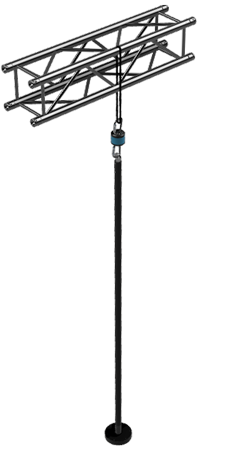
Suspended from an overhead rigging point, in a wired version and a self-contained wireless one. Every section of this page is listed under On this page.
Rigging is a job for a qualified rigger, and we do not specify it. Read Rigging an aerial pole and What this page does not cover yet before you plan a hang.
Specs
| Feature | Description |
|---|---|
| Configuration | Single Piece |
| Overall length | 95 in, top fitting to the bottom of the base |
| Lit length | 84.5 in |
| Ships in | An 8 ft tube, which is the size the pole is built to fit |
| Diameter | 46mm |
Plan a hang from the two length figures, not from the shipping size. See Sizing for where each one is measured.
Sizing
The lit section is shorter than the pole. The drawing below carries both numbers, and they are not interchangeable when you plan a hang.
 1
2
3
4
5
1
2
3
4
5
- Top fitting The point at the very top of the pole. The overall dimension is measured from here.
- Where the light starts The LED section begins below the top fitting, not at the top of the pole.
- Overall, 95 in Top fitting to the bottom of the base.
- Lit length, 84.5 in The LED display height. This is the number that decides how much of a hang the audience sees lit.
- Base The platform at the bottom of the pole. On a wireless pole this is where the battery and the media server live.
The pole is sized to fit inside an 8 ft tube, which is the longest length that ships without the cost climbing steeply. Contact us for custom sizing.
Variants
There are two aerial poles, and the difference is where the power and the content come from. One takes both down a cable. The other carries both with it.
- Power
- A permanent power connection. There is nothing to charge.
- Content
- A wired data connection carries the content in from outside the pole.
- Where the parts sit
- A swivel combined with a slip ring keeps power and data connected while the pole spins freely.
- Cables
- Required. The power and data cables have to be run along with the rigging, where that is possible.
- Run time
- Continuous. No charging step.
- Control
- Real time data streaming, for robust external control.
- Power
- A battery.
- Content
- An onboard media server plays the content from the pole itself.
- Where the parts sit
- The battery and the media server are built into the platform at the bottom of the pole.
- Cables
- None. The pole connects to rigging on its own.
- Run time
- Limited. The battery has to be recharged.
- Control
- Less control. Triggering content during a show needs a wireless system.
On the wired pole we combine a swivel with a slip ring, so the pole can carry a hardwired power and data connection and still spin freely. On the wireless pole, for a hang where running cables to the top is not practical, the battery and the media server are built into the platform at the bottom instead.
Rigging an aerial pole
An aerial pole hangs over people. PoleFX supplies the pole and its top point. We do not specify the rigging: no hardware ratings, no working loads, no inspection intervals and no stop-use criteria appear anywhere in this documentation. What holds depends on the structure you are hanging from and on the loads your act puts through it, which only a qualified rigger on site can judge. Have one specify, install, and inspect the hang.
Ask us for the pole's mass and the geometry of its top point, and we will give your rigger the numbers we have.
The one arrangement we have written down is in Rigging, pre-2025 pole inside the Pre-2025 section below. It says to use a rated carabiner at the top point rather than a spanset directly, and that we typically run two carabiners with a swivel between them. It describes how we hang that pole. It is not a specification, it names no ratings, and it has not been reviewed against the current poles.
What this page does not cover yet
The current wired and wireless poles are compared under Variants, and that comparison is as far as this page goes for them. Not written down yet:
Nothing here tells a current wireless pole from a pre-2025 one by looking at it. If you are not sure which you own, ask us before you follow the Pre-2025 steps below, because they are a different assembly.
The assembly, power-up and charging steps below are the pre-2025 base. A current pole's battery, switch and charge point are not documented.
There is no PoleFX inspection checklist, interval, or wear limit for any aerial pole. Your rigger's own regime governs.
Every gap above is a real gap rather than an omission you can fill by reading across from another pole. Get in touch and we will answer for your specific unit.
Pre-2025 pole
Everything below is folded away because it applies to one pole only. Open it if you have a pre-2025 pole, and ask us first if you are not sure which you have.
Pre-2025 pole: base assembly, power up, battery, and rigging
Base Assembly
The pole and base are shipped separately. First, mount the base and connect the LED strips to the controller.
Step 1: Remove Bottom Cover
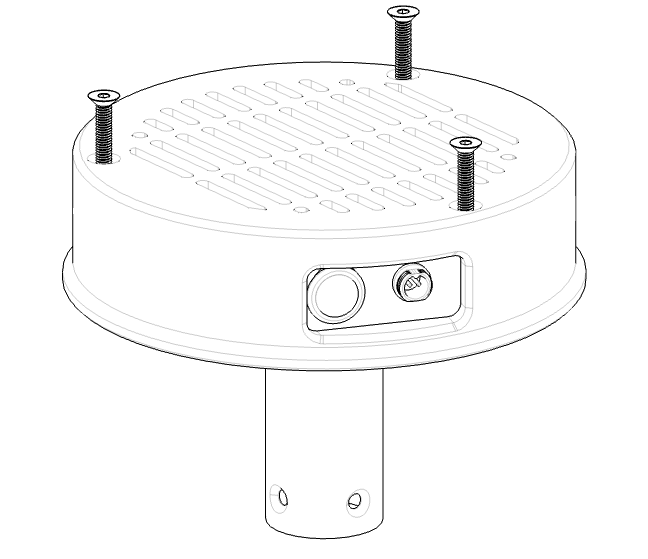
Using a 4mm allen wrench, remove the three M6x55mm bolts that hold the bottom cover in place. Remove the cover.
 1
2
3
4
5
1
2
3
4
5
- Bottom cover The vented disc. Step 1 takes it off, and Step 5 puts it back.
- Three M6x55 bolts The only fasteners holding the cover. A 4 mm allen wrench turns them.
- Power switch In a recess in the side of the housing. This is the switch Power up below asks you to flip.
- Round connector Next to the switch. This is where the charger lead plugs in: the same recess is in the charger photo further down.
- The pole end The base slides over this in Step 2, and the eight M6 bolts in Step 3 hold the joint.
Step 2: Insert base onto pole
Gather the 4 sets of LED connectors so that they’re all recessed in their channels.
Slide the base over the end of the pole. Be careful to not damage the wires in this step.
Align the white lines on the base and pole. The base only fits well in one orientation.
Step 3: Fasten bottom tube bolts
Loosely insert all 8 M6 bolts coupling the base to the pole before tightening them all down.
Step 4: Connect the LED cables
The connectors coming from the controller are labeled 1-4. Each one mates with the LED lead in the matching channel.
Which lead belongs to which of the four connectors is not recorded anywhere, and this page will not guess at it. Match the labels if your leads carry them. If they do not, photograph the connector field before you unplug anything, and ask us rather than working through the combinations: a wrong pairing shows up as scrambled output, not as damage, so it is easy to leave wrong.
Step 5: Reattach the bottom cover
Make sure the wires are tucked away neatly and will not get crushed.
Insert the 3 M6x55 bolts, make sure the threads engage in the steel plate and tighten until it begins to get snug. Do not over-tighten the bolts.
Power up
Turn the pole on by flipping the power switch on the bottom.
When the pole gets power, it will flash purple at the bottom within a few seconds of booting.
The animation will not begin until the player boots, which takes around a minute.
Battery, pre-2025 base
The pack and charger below are the ones in a pre-2025 base. A current wireless pole is a different assembly, so ask us before you order a replacement pack or charger for one.
Battery life: Depends on brightness of content being played, expect between 2 and 5 hours.
Charging: Approximately 4.5 hours if fully drained. Use only the supplied charger.
Light on charger turns from red to green when fully charged.
Battery: Li-Ion 14.8V 5200mAh 76.96Wh Battery pack - Tenergy #31892
Charger: Tenergy TLP3000 1.5A Charger for 14.8V cells
 1
2
3
4
5
1
2
3
4
5
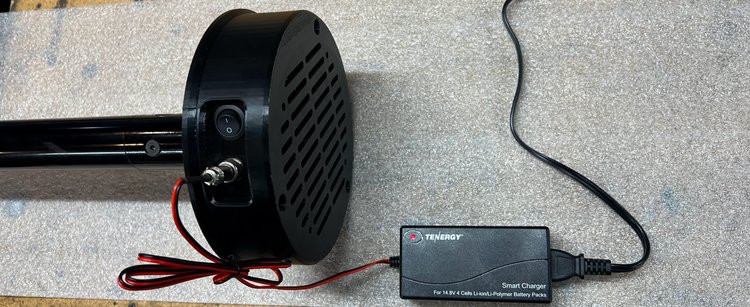
- Power switch In a recess in the side of the base. This is the switch that turns the pole on.
- Charge connector The round connector in the same recess. The charger lead plugs in here.
- Charge lead Red and black, base to charger.
- The charger Labeled Smart Charger, For 14.8V 4 Cells Li-ion/Li-Polymer Battery Packs. The model is named above: Tenergy TLP3000. Use only the supplied charger.
- Mains lead From the charger to a wall socket.
The light shows red first. From fully drained, allow about 4.5 hours.
The light turns from red to green when the pack is fully charged.
A range, not a number. It depends on how bright the content playing is.
5200 mAh, 76.96 Wh, Tenergy #31892. The TLP3000 above charges it.
Rigging, pre-2025 pole
Use a rated carabiner to attach to the pole’s top point. Don’t attach a spanset to it directly.
We typically use two carabiners with a swivel between.
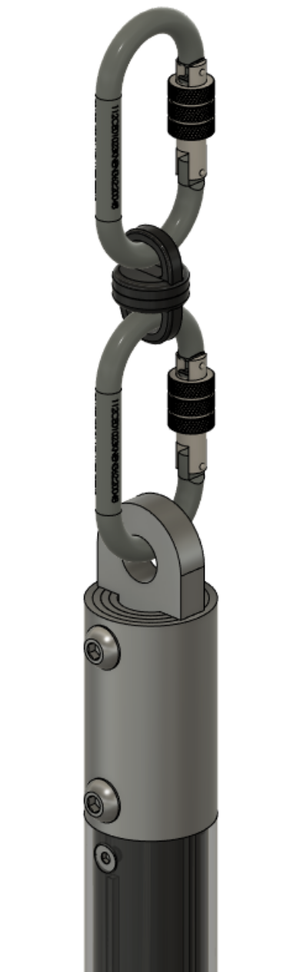
That is the whole of what we have written down, and it describes how we hang this pole rather than specifying how yours should be hung. See Rigging an aerial pole above for what it does not cover.