
Preview
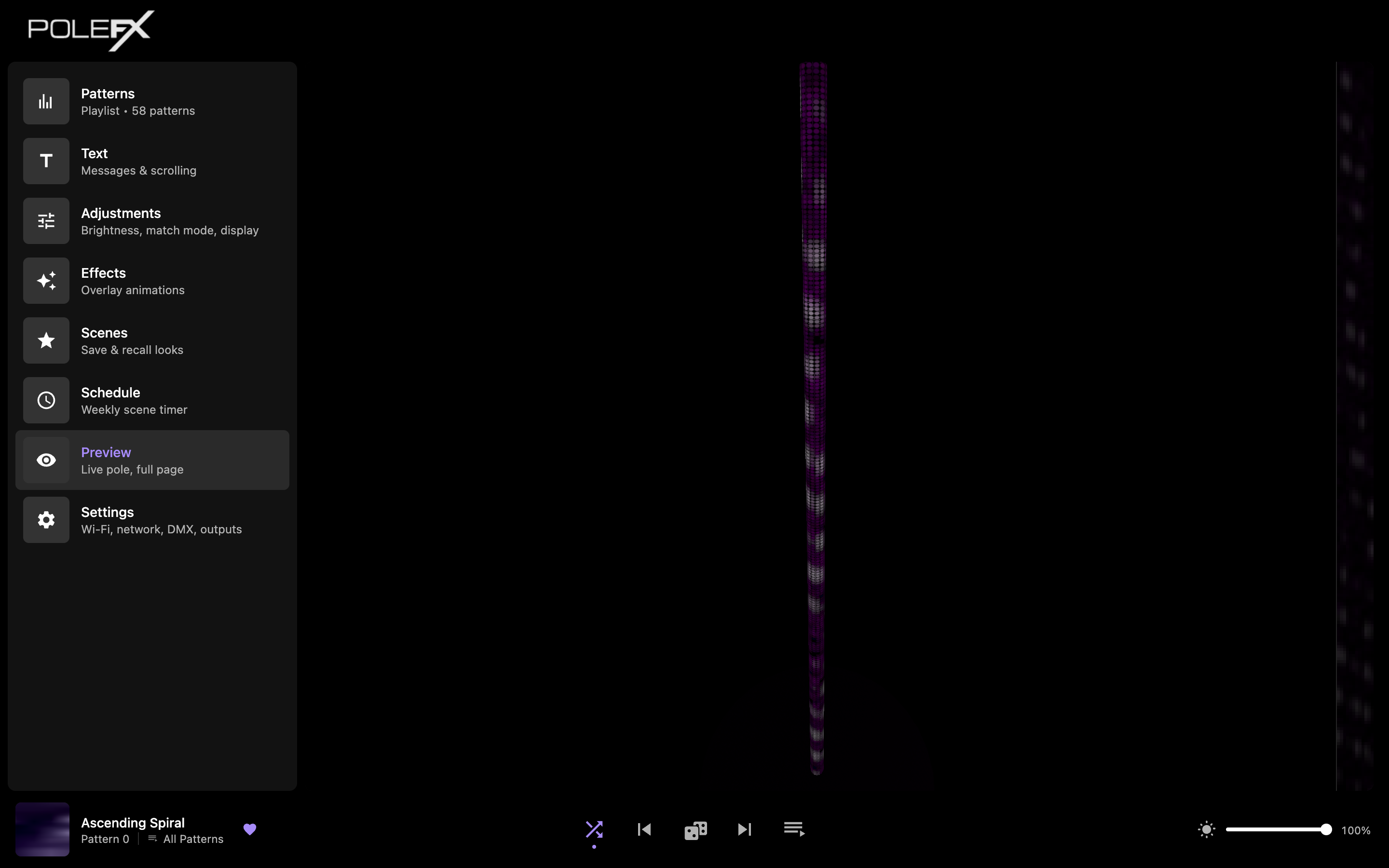
A full-page, live 3D render of the pole: the same per-LED frames the engine is sending right now.
 1
2
3
4
5
1
2
3
4
5
- Preview The page you are on, highlighted in the rail. The rail and the playback bar stay where they are, so this is a bigger view rather than a different mode.
- The pole A 3D model carrying the engine's real output, one dot per LED. Drag it to turn it, scroll to zoom in close enough to count the LEDs. The view is not saved: a reload puts the camera back.
- Flat strip The same frame with the pole unrolled flat, the length of the pole running down it. It is plain 2D, so it keeps running even when the 3D model cannot.
- Where the panel was Nothing is missing here. On every other page a live preview panel fills this column, and opening Preview folds it away, because its render is the one now standing in the middle.
- Playback bar What is playing, the transport, and global brightness, on this page as on every other. You can change pattern without leaving the full view.
The panel labeled Live preview in the figure on the Patterns page is this same render, small and parked on the right. Both views draw the identical stream of frames, so use whichever suits the screen you are on: the panel while you work, the page when you want to judge the look.
On a phone the panel does not fit beside the page at all, so the render lives on Preview only.
What the preview is, and is not
The browser is not playing your pattern file. The engine sends it the per-LED frame, with the pattern, any text and global brightness already in it. Every dot you see is one real LED value.
Two things happen to that frame after the preview branches off, which is why the preview and the pole are close rather than identical. Each pole applies its own gamma on the way out to the wire, and the preview frame is taken before that. The browser then encodes the values for your screen, so that what you see tracks the light the pole puts out rather than the raw numbers. On a pole left at the default gamma of 1.0 the first difference is nothing at all.
- What it draws
- The engine's frame, one dot per LED, encoded by the browser for your screen. The pole's own gamma is not in it.
- How often
- About 30 frames a second, half the 60 fps the pattern content runs at.
- Brightness
- Follows the global brightness slider, because that is already in the frame. How bright it looks is your screen.
- Added by the render
- A soft glow around lit LEDs, and the dot grid itself. Neither is in the frame.
- Trust it for
- Which pattern is playing, timing, direction, where text sits, how a scene reads.
- What it draws
- The same frame with that pole's gamma applied, as light from real LEDs.
- How often
- Every frame. The preview is the copy that is thinned out, not the pole.
- Brightness
- Real output, which depends on the room, the distance, and what else is lit.
- Added by the render
- Nothing. Any glow you see is the room.
- Trust it for
- The final call on brightness and color, and on how a fast pattern reads from across a room.
Holding a phone camera up to the pole and comparing the photo with the preview is not a fair test. The camera picks its own exposure and white balance, and a bright LED against a dark room is exactly the shot it gets wrong. Judge the pole with your eyes, and use the preview for what the frame contains.
When the preview is black
The 3D pole needs a browser with WebGL and hardware acceleration. Nothing else in the web app does, which is why this is the one page that can fail on its own.
Two different faults look like one black rectangle. The flat strip beside the pole tells them apart: it is drawn without 3D, so if it is still moving, the frames are arriving and only the 3D view has failed.
Dark for a moment after the page opens, then the pole lights. The page asks the engine for frames every couple of seconds while the tab is in front, and the engine stops sending when nobody is watching, so coming back to a background tab also takes a moment.
The pole is lit and moving, the flat strip beside it moves with it, and both match the physical pole.
The words 3D preview unavailable in place of the model. The browser refused a WebGL context. The flat strip keeps running. Work down the list below.
The model is there but nothing lights, and the flat strip is dark too. Nothing is arriving, or the pole really is dark: check global brightness at the bottom right, and look at the pole itself before you blame the browser.
Getting the 3D view back
Work down this list and stop as soon as the pole appears.
-
Reload the page
A refused context is usually a one-off, and a reload asks for a new one.
You should see The pole render, within a second or two of the page settling.
-
Close other PoleFX tabs
Every open copy of the web app holds a 3D context, and a browser only hands out so many. Old tabs left open on another page of the app count.
You should see The render come back on the remaining tab, after one more reload.
-
Turn on hardware acceleration
It is a setting in the browser, not in the web app, and it is switched off on some managed laptops. Look for graphics or hardware acceleration in the browser's own settings.
You should see The render work after restarting the browser.
Careful The pole itself is unaffected throughout. This is your browser, not the player, and the show keeps running.
-
Get in touch
Tell us the browser and version, and whether the flat strip was still moving while the pole was black. That one answer splits the problem in half.
You should see A reply that already knows which half to look at.