
Adjust Settings
General display settings in the previous player interface. For the map of the whole screen, see the interface map.
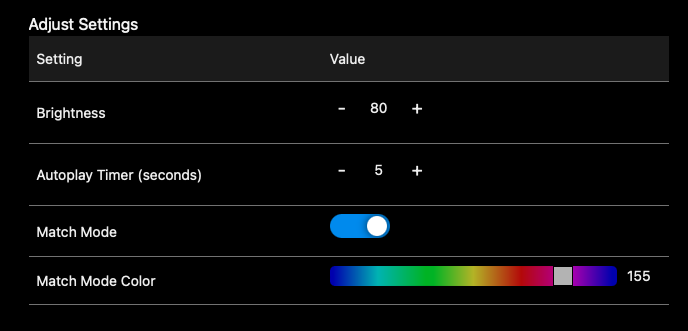
- Brightness: overall pole brightness.
- Autoplay Timer: seconds between automatic pattern changes.
- Match Mode: recolor every pattern to one consistent hue.
- Match Mode Color: choose the hue used by Match Mode.
Previous PlayerBefore July 2026Adjust
 1
2
3
4
5
6
1
2
3
4
5
6
- Setting and Value Two columns. Each row is one setting, with its control on the right.
- Brightness Overall pole brightness, 80 in this capture. This is the one to reach for when the whole pole is too bright.
- Minus and plus The number between them is the value. Brightness and the Autoplay Timer are both set this way, one step at a time.
- Autoplay Timer (seconds) Seconds between automatic pattern changes. Shuffle and Playlist use it.
- Match Mode Switched on here. It recolors every pattern to one consistent hue, so the animation keeps playing and only its color changes.
- Match Mode Color The hue Match Mode uses. The handle on the hue bar picks it, and the number to the right of the bar is the value, 155 here.
The Autoplay Timer only does something in the play modes that change pattern on their own. Set the mode with PLAY MODE at the foot of the page: see the interface map.
Previous interface guide
You are reading the guide for players supplied before July 2026. These are its three pages.